You may have noticed that there's no "Donate Now" or "Shop" button on our website.
Not only are we unequipped to handle online ordering, it's completely unnecessary.
Printing a postcard is cheap and easy, either on your home printer or via a printing service, such as:
You may have noticed that there's no "Donate Now" or "Shop" button on our website.
Not only are we unequipped to handle online ordering, it's completely unnecessary.
Printing a postcard is cheap and easy, either on your home printer or via a printing service, such as:
Order Postcards from Staples
We encourage you to support a local printer if you have the means and opportunity.
However, if cost or convenience is paramount, we have found Staples to be the most convenient and cost effective among the major retailers.
Go to https://www.staples.com/services/printing/sales-marketing/custom-postcards/
Step 1: Select Your Options
We recommend the following:
| Orientation |
Landscape |
| Size |
5.5" x 4.25"
Our designs are optimized for 5.5" postcards. However, they should still be suitable for 6" postcards. (You may need to adjust the "back" image to fit properly.)
|
| Sides |
Double Sided
We feel this additional cost is justified as it makes clear that the final result is a postcard, not a flyer.
|
| Material |
Basic 12pt |
| Finishing |
Glossy
Glossy doesn't appear to cost any extra, and makes the postcard slightly more water resistant. However, either option is suitable.
|
| Quantity |
50
The quantity is truly at your discretion. However, we found this option introduces the biggest price drop (over 55% discount per card).
We recommend printing as many as you can afford and reasonably distribute.
|
Step 2: Upload Your Designs
Underneath "Add content", click the "Upload design" button. This will launch an online designer. (You may need to wait a few moments.)
When the online designer has loaded, you should see the "Front" of your postcard:
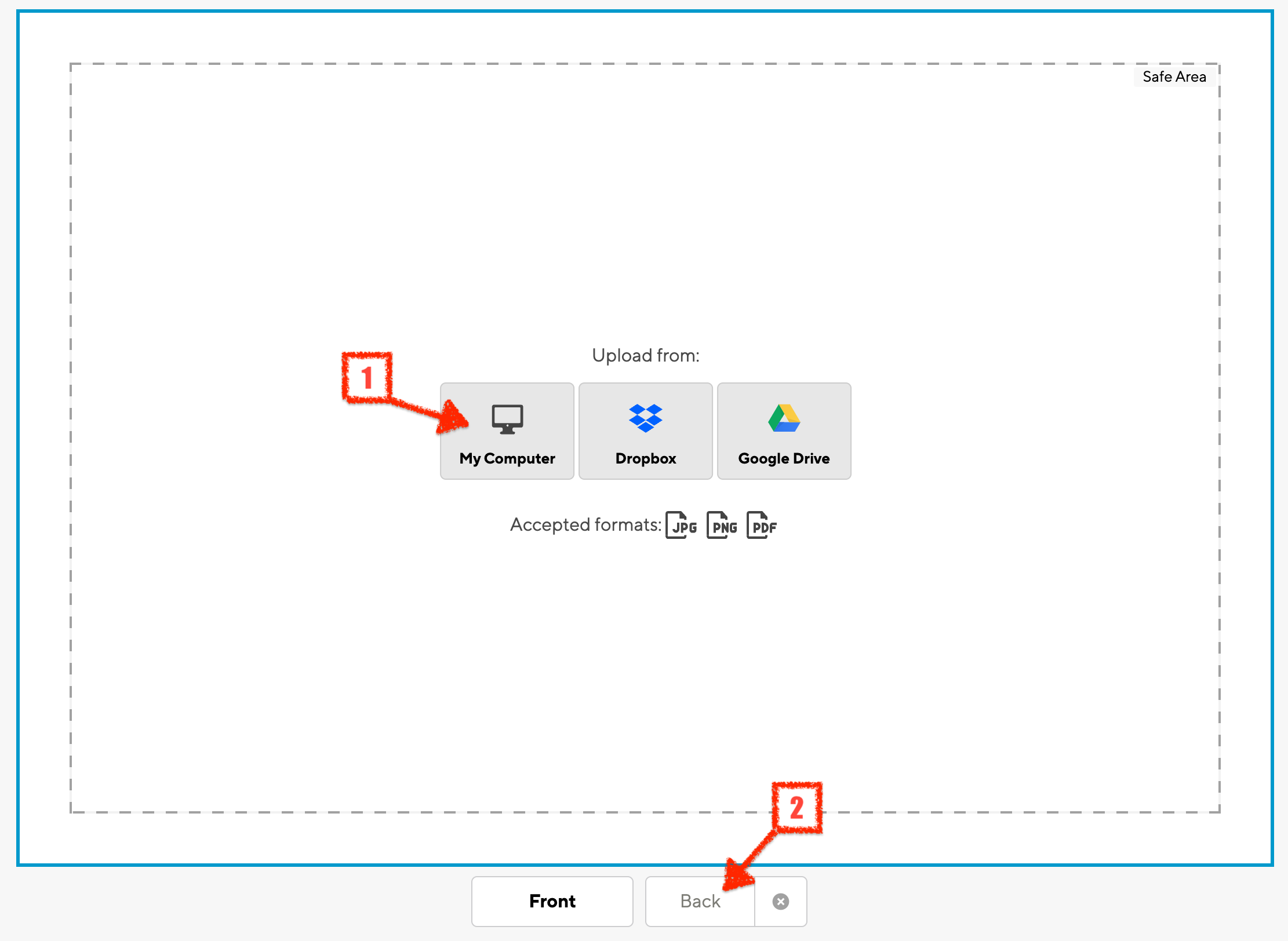
Click the "My Computer" button to upload the "front" postcard image from your file system.
Depending on the settings your selected in Step 1, you may or may not need to adjust the size and orientation of the image.
Click the "Back" button underneath the canvas (directly next to the "Front" button) and then repeat the steps above to choose your "back" postcard image.
Step 3: Complete Your Order
Click "Continue" in the upper-right corner, and follow the on-screen instructions to select a store, choose pickup or shipping, and select your payment method.
Step 4: Distribute Your Postcards
When you receive your postcards, send them to your elected officials.
Then, give away the extras to anyone who might use them! We recommend family, friends, neighbors, community groups, coffee shops, and libraries.